Standalone Creator Software · Local BYOK · Zero Subscriptions
YouTube analytics, without the monthly tax.
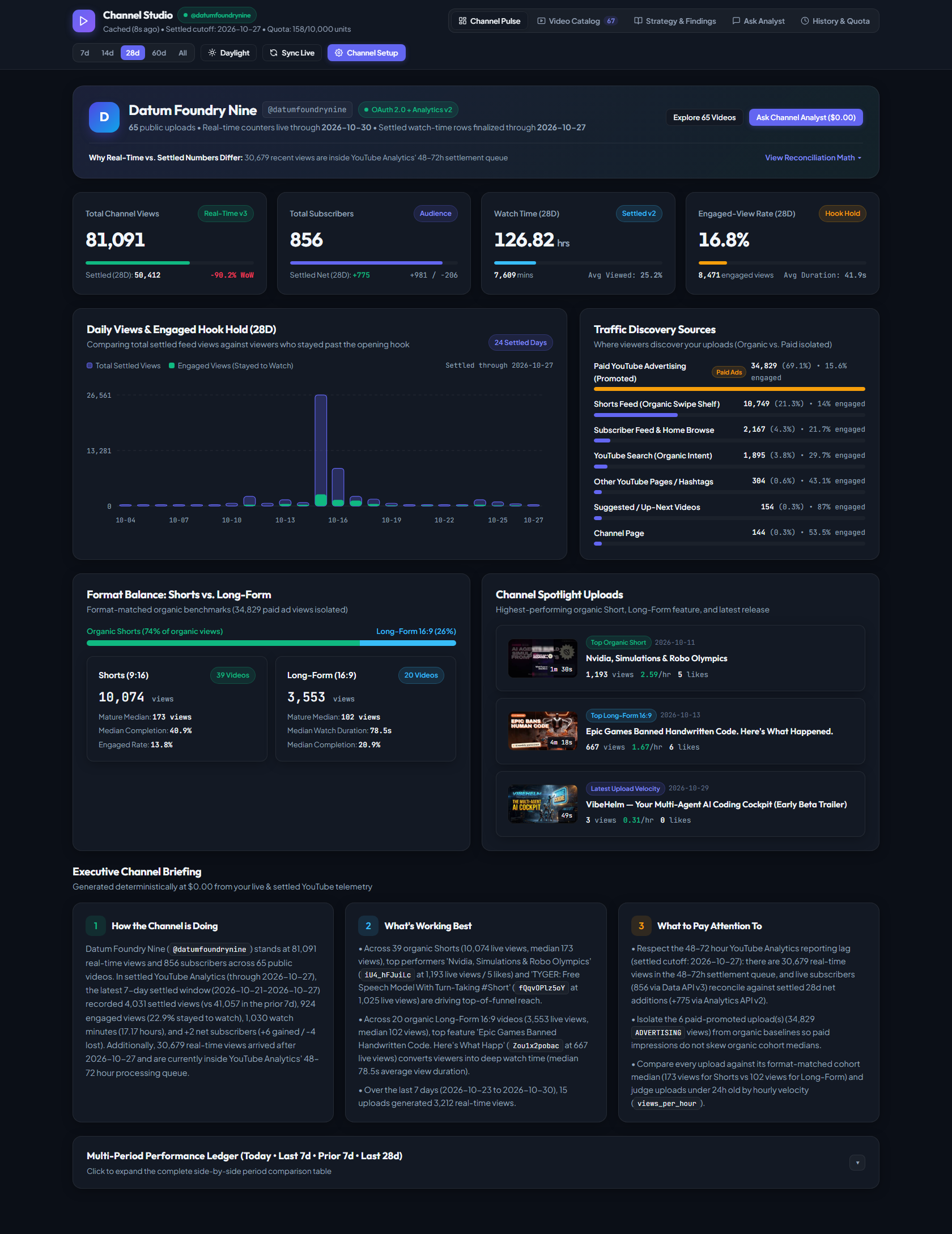
Most creator dashboards charge £39–£79 every month and still lump paid ad views into your organic baselines. Channel Studio runs locally on your own machine, connects directly to your YouTube Data API v3 and Analytics API v2, and writes plain-English evidence briefings at a £0.00 running cost.
.exe + macOS/Linux Python source bundle
02Why we built it
Four things standard YouTube dashboards get wrong.
We built Channel Studio for our own YouTube production pipeline at Datum Foundry Nine because existing tools either hid the numbers that mattered or charged a monthly subscription to read our own data back to us.
Paid promotion never pollutes your organic baselines.
If you run a £20 Google Ad promotion on a trailer, standard YouTube Studio mixes those paid impressions into your channel-wide retention and subscriber averages. Channel Studio queries insightTrafficSourceType per video and isolates ADVERTISING traffic into its own cohort automatically.
No more false “traffic drop” panics on recent uploads.
YouTube Data API v3 updates views and subscribers in real time, whereas YouTube Analytics API v2 takes 48–72 hours to settle daily watch-time rows. Channel Studio reconciles both APIs side by side and shows exactly how many live views are sitting in the 72-hour settlement queue.
See the exact second viewers swipe away.
Inspect true 100-point audienceWatchRatio curves for any settled video on your channel, alongside opening 10% hook hold, 50% midpoint hold, and format-matched peer medians (Shorts benchmarked against Shorts; Long-Form against Long-Form).
Executive briefings with zero hallucinated numbers.
The built-in Deterministic Evidence Engine computes your executive briefing, 6 deep findings, and 7 content playbooks directly from verified API telemetry at £0.00 cost. Want natural-language chat? Use the £0.00 engine, a local GPU model (Ollama / LM Studio), or your own optional Claude / OpenAI key.
03Visual setup tutorial
Up and running on your channel in three minutes.
Because Channel Studio is a local Bring-Your-Own-Key (BYOK) application, your credentials never touch an external server. Here is the exact 3-minute setup flow from unzipping the download to seeing your live channel briefing.
Unzip and double-click ChannelStudio.exe
No Python installation or command-line setup required on Windows. Double-clicking ChannelStudio.exe starts the local studio on port 8797 and automatically opens your browser to the First-Boot Onboarding Modal.
- Windows 11 / 10: Double-click
ChannelStudio.exe(orStart-Channel-Studio.bat). - macOS / Linux: Double-click
Start-Channel-Studio.commandin the included source bundle. - Expand the built-in 3-Minute Google Cloud Setup Guide card right at the top of the modal.
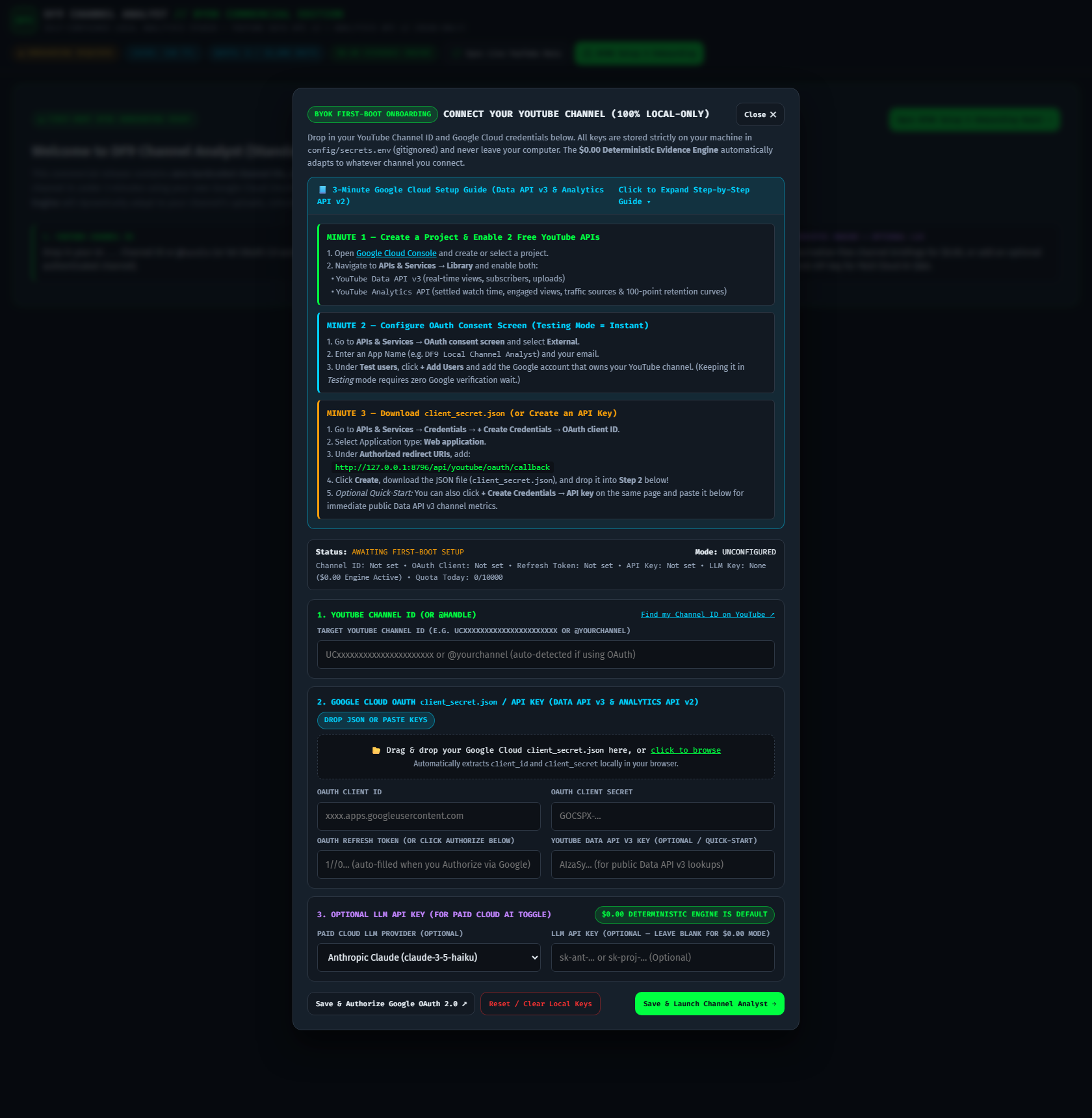
Enable two free YouTube APIs & download client_secret.json
Google gives every account 10,000 free YouTube API quota units per day—more than enough for hundreds of channel refreshes.
- In Google Cloud Console, enable YouTube Data API v3 and YouTube Analytics API.
- Under OAuth consent screen, select External (keep it in Testing mode—instant setup, zero Google verification wait) and add your YouTube email under Test users.
- Under Credentials → Create Credentials → OAuth client ID (Web application), paste this exact Authorized Redirect URI:
Drop in your JSON file and click Save & Authorize
Drag your downloaded client_secret.json onto Step 2 of the onboarding modal. Channel Studio extracts your Client ID and Secret locally in your browser and stores them in config/secrets.env on your disk.
- Click Save & Authorize Google OAuth 2.0 ↗ and approve read-only YouTube access in your browser.
- Channel Studio automatically detects your YouTube channel, saves a local SQLite snapshot in
data/channel_analyst.db, and opens your live studio. - Switch freely between Studio Obsidian Dark and Daylight Editorial Mode at any time.
04Own it outright · Fair-Share Pricing
Pay once. Run it on your machine forever.
No recurring subscriptions, no cloud lock-in, and no artificial tiering—every buyer gets both the standalone Windows executable and the full cross-platform source code.
Hosted cloud subscriptions that charge you every month to view your own channel’s API data.
- Mixes Paid Google Ads views into your organic retention medians
- Requires granting a third-party cloud server permanent access to your channel token
- AI channel questions gated behind monthly credit limits
- Stop paying and you lose access to your historical snapshots
Fair-share indie pricing: Pay £19.99 if you’re an independent creator starting out, or £39.99+ (recommended) if you run an established channel or studio. Either way, you get the complete, unthrottled software forever at £0/month ongoing cost.
- Windows Standalone App (
ChannelStudio.exe): Double-click to launch—zero Python setup required - Cross-Platform Source Bundle (macOS / Linux / Windows): Full unencrypted Python + FastAPI + Vanilla JS source code included
- All 5 Studio Views Unlocked: Channel Pulse, Visual Video Catalog, Strategy & Findings, Ask Analyst, and History & Quota
- Automatic Paid vs. Organic Traffic Isolation & 100-Point Audience Retention curves
- £0.00 Deterministic Evidence Engine + optional Local GPU LLM (Ollama / LM Studio) & Cloud AI support
- Built-in 3-Minute Google Cloud Setup Guide inside the First-Boot Onboarding Modal
Pay what you want (£19.99 min · £39.99 recommended) · 100% local privacy
Do I need to pay for Google Cloud or an OpenAI/Anthropic API key to use this? +
No. Both the YouTube Data API v3 and YouTube Analytics API v2 are free to enable in Google Cloud Console (with a free daily quota of 10,000 units), and Channel Studio’s default Deterministic Evidence Engine generates your executive briefings, cohort comparisons, and Q&A answers at £0.00 cost. Adding a paid Anthropic or OpenAI key is 100% optional.
Do I need Python installed on my computer? +
If you are on Windows 10 or Windows 11, no—the download includes the standalone ChannelStudio.exe executable that runs out of the box. We also include the clean Cross-Platform Source Bundle with 1-click launchers for macOS, Linux, and developers who want to customize the code.
Can I connect multiple YouTube channels? +
Yes. You can switch channels at any time inside the Channel Setup modal, or duplicate the folder to keep separate local SQLite databases for each channel you manage.